What is Apptainer (formerly Singularity)
Until November 2021, Apptainer was known as Singularity. In 2021, stewardship of parts of the Singularity project was transferred to the Linux Foundation, and the fully open-source version was renamed Apptainer.
- The Apptainer development began at the Lawrence Berkeley National Lab in 2015 by Gregory Kurtzer to bring safe, unprivileged (non-root) containerization to HPC environments.
- Its goal was to provide a portable way to run Linux applications on HPC clusters, regardless of the host Linux distribution or version.
- In other words, it packages the compiled software together with its compute environment, making it portable across different Linux systems.
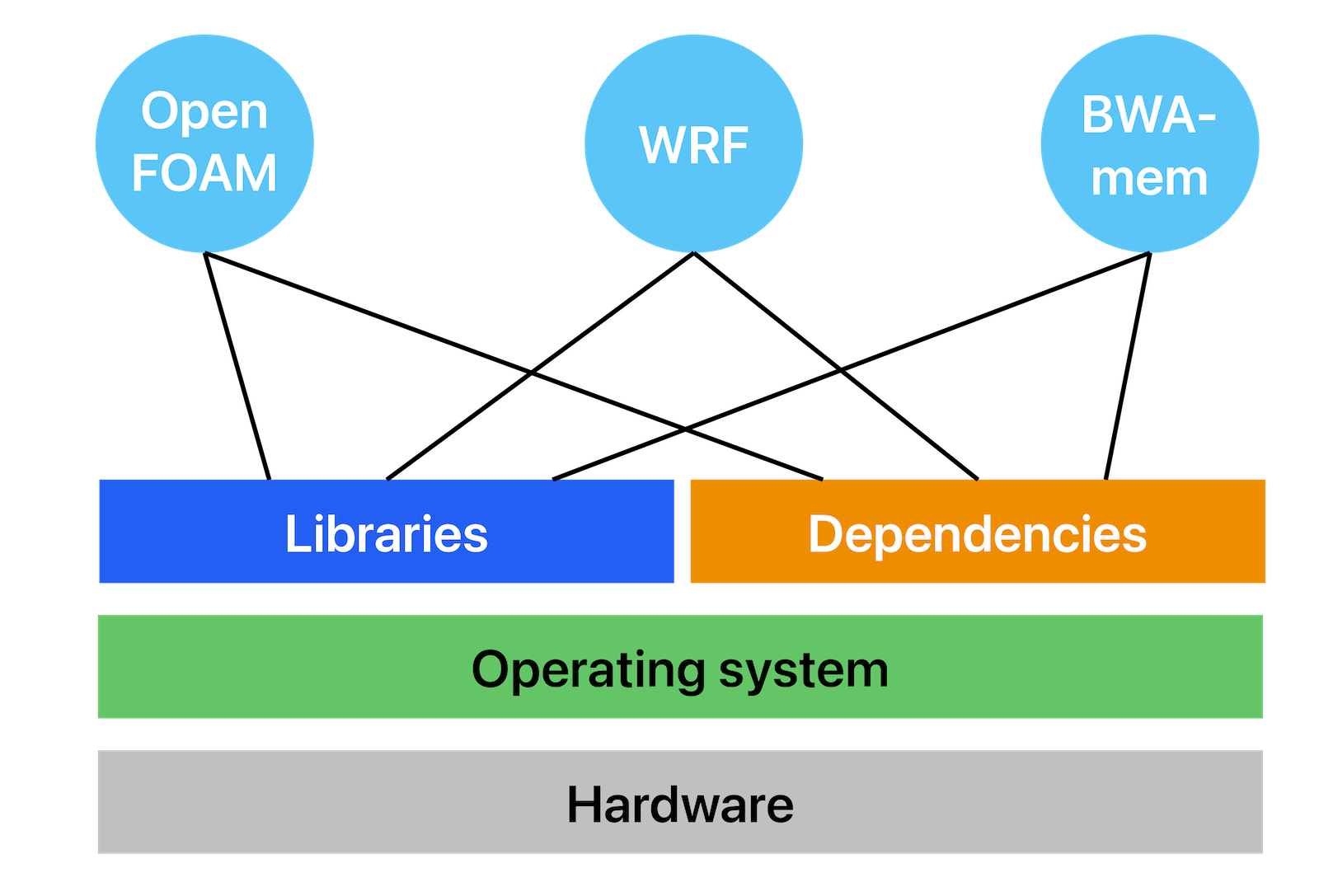
To address this, Apptainer creates a custom, secure virtual Linux environment (a container) that bundles the application and its libraries and dependencies. Applications inside the container run independently from the host machine.
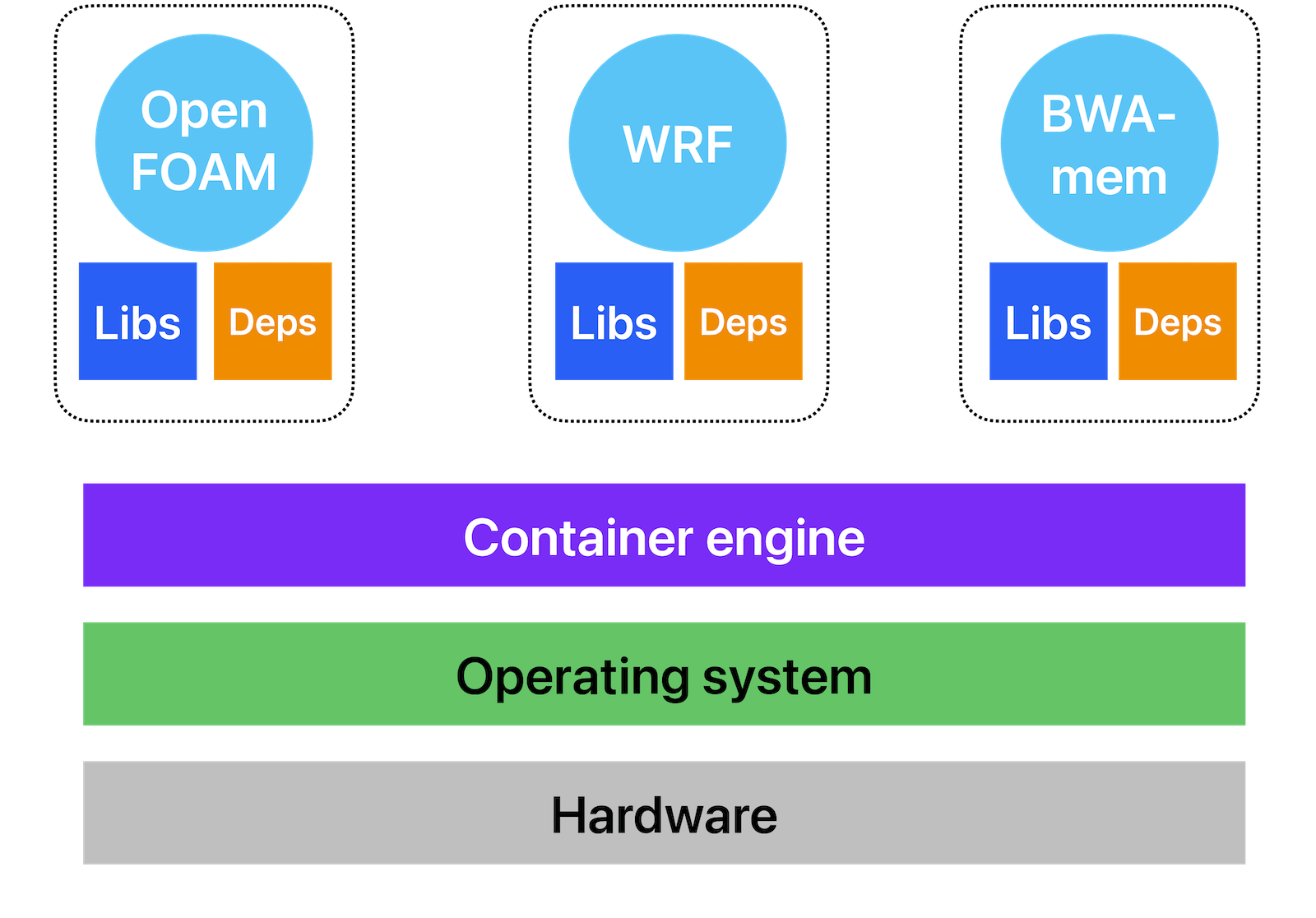
Usually this is done by creating a target Linux system inside the container and then installing applications inside it. For example, on a CentOS/Rocky Linux machine you can create a virtual Ubuntu system where you can install any precompiled packaged software from the Ubuntu repositories.
Technical details
From the technical standpoint, Apptainer uses:
- kernel namespaces to virtualize and isolate OS resources – CPU, memory access, disk I/O, network access, user/group namespaces – so that processes inside the container see only a specific, virtualized set of resources,
- Linux control groups (cgroups) to control and limit the use of these resources, and
- overlay images to enable writable filesystems in otherwise read-only containers.
When to use a container
Idea: package and distribute the software environment along with the application, i.e. create a portable software environment. More specifically, with containers you can:
- avoid compiling complex software and run it instead in the environment where it is already available, e.g. inside a pre-existing container,
- run older software that is now hard to compile (missing dependencies),
- use a familiar software environment across different HPC centres, independently of the underlying system, and
- preserve and share your build with others.
When not to use a container
Do not use Apptainer if your software is already installed on the Alliance clusters. Learning and understanding Apptainer is more difficult than learning how to use our software modules or pre-compiled Python packages.
In most cases, an off-the-shelf Apptainer image will meet your needs. You should only build a custom image if you have a specific, justifiable requirement. In practice, most users who think they need a custom image actually don’t – though when a custom solution is genuinely necessary, Apptainer handles it exceptionally well.
Containers vs. virtual machines
- Container = the OS-level mechanism to isolate some parts of the OS along with a given application.
- virtualizes an operating system
- lets you run an application compiled for a specific Linux OS on another Linux OS
- almost no performance overhead
- Virtual machine (VM) = complete isolation from the host OS via virtualized hardware
- virtualizes hardware
- maximum flexibility, can mix any combination of host and guest OS’s
- significant performance overhead, as you run on simulated hardware
On a Linux host Apptainer is very lightweight compared to a full virtual machine (VM). On a MacOS or Windows host Apptainer can be deployed inside a VM, as you still need a Linux host layer.
Container engines
Docker: container platform for services, runs as root on the host system, uses cgroups for resource management between different VMs on a given node, very popular with software developers, can’t really use it on HPC systems (no root or sudo possible for users on clusters + cgroups resource management will conflict with HPC resource managers).
Apptainer: run containers entirely in user space, as a user, can use existing Docker containers (Apptainer will convert them to proper SIF images for you), works seamlessly with the schedulers.
Apptainer is different from Docker, as it does not require root access on the host system to run it. Apptainer is specifically designed for running containers on multi-user HPC clusters, and it quickly became a way to package and deploy scientific software and its dependencies to different HPC systems.
There are few other container engines focusing on specific features.
Installing/running Apptainer on your own computer
Even though Apptainer was originally developed for use on HPC clusters, you can also run it on your own computer:
| Host OS | Run Apptainer |
|---|---|
| Linux | Install and use an Apptainer package1 |
| Any host OS | In a VM running Linux |
| Windows or MacOS | Inside Docker (download a Docker image with Apptainer installed) or Vagrant |
Glossary
An container image is a read-only bundle of files including an operating system, software and potentially data and other application-related files. Apptainer uses the Singularity Image Format (SIF), and images are typically stored as single .sif files.
A container instance is a virtual environment based on an image. You can start multiple container instances from the same image.
An operating system (OS) is all the software that let you interact with a computer, run applications, UI, etc, consists of the “kernel” and “userland” parts.
A kernel is the central piece of the OS that manages hardware and provides resources (CPU, I/O, memory, devices, filesystems) to the processes it is running.
A filesystem is an organized collection of files. Under UNIX/Linux, there is a single hierarchy under /, and additional filesystems are “mounted” somewhere under that hierarchy.
Apptainer on HPC systems
We will now distribute usernames and passwords for our training cluster.
Let’s log in to the training cluster sfu-container.c3.ca and try loading Apptainer:
module load apptainer/1.4.5   # latest installed at the time of writing
apptainer --version
which apptainer
apptainer # show the list of available commandsApart from this short example, please do not run Apptainer on a cluster’s login node. Apptainer can be quite resource-demanding, so we will run on a compute node inside a Slurm job. I will explain how to do that in the next section. The same applies to our production clusters: always schedule either an interactive or a batch job to run Apptainer workflows.
Footnotes
If using Apptainer inside a cloud VM, you will need to install it via
sudo add-apt-repository -y ppa:apptainer/ppa && sudo apt install -y apptainer, and then you can use it as root to build Apptainer images.↩︎